How to Create a WhatsApp Chat Link (wa.me) With Pre-Filled Messages for Ads, Instagram, and Websites
TL;DR: A WhatsApp chat link (built on Meta's official
https://wa.me/short domain) lets anyone start a WhatsApp conversation with your business in one tap without saving your phone number to their address book first. You can generate a properly formatted E.164 link with a custom pre-filled message and downloadable QR code in 5 seconds using the free AIsoule WhatsApp Link & QR Code Generator.
Need your link right now? Open our free WhatsApp Link Generator, type your phone number and welcome message, and copy your ready-to-use wa.me link and SVG/PNG QR code immediately.
Get Started →What Is a WhatsApp Click-to-Chat Link and Why Does It Matter?
On mobile devices, asking a prospect to copy your phone number from your website, open their Contacts app, create a new contact, save it, open WhatsApp, refresh their contact list, and type a message causes over 70% of visitors to drop off before sending a single word.
A WhatsApp Click-to-Chat link removes all six steps. When a visitor taps your wa.me URL in an Instagram bio, YouTube video description, email signature, or website button, their phone immediately opens WhatsApp with your business chat loaded and a pre-written message waiting in their text box. All the buyer has to do is tap Send.
Featured Snippets & Quick Answers: WhatsApp Link Generator
How do I create a WhatsApp link for my phone number?
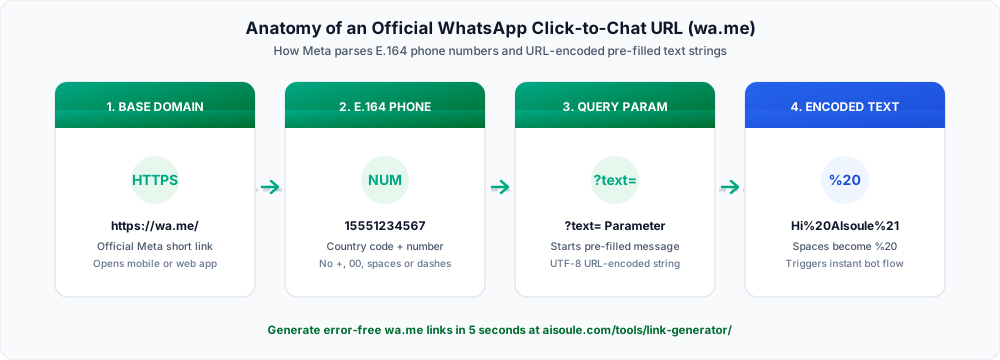
Use the format https://wa.me/CountryCodePhoneNumber using only digits (no plus sign, leading zeros, spaces, or parentheses). For example, an Indian number +91 98765 43210 becomes https://wa.me/919876543210, and a US number +1 (555) 234-5678 becomes https://wa.me/15552345678.
How do I add a pre-filled message to a WhatsApp link?
Append ?text= followed by your URL-encoded message to the end of your wa.me URL, or generate it automatically in the free AIsoule WhatsApp Link Generator. For example: https://wa.me/15552345678?text=Hi%2C%20I%20want%20a%20price%20quote.
Are wa.me links free and permanent?
Yes. Links created with Meta's official https://wa.me/ structure are 100% free, never expire, have zero click limits, and work across iOS, Android, WhatsApp Web, and desktop apps.
The Exact Syntax Rules (And 4 Formatting Mistakes That Break Links)
When marketers build wa.me URLs by hand in a spreadsheet, a single stray symbol breaks the redirect. Compare the broken vs working formats below:
To eliminate manual URL encoding errors (such as converting spaces to %20, line breaks to %0A, and ampersands to %26), use the WhatsApp Chat Link Generator.
How Pre-Filled Links Trigger Automated Chatbot Flows
A plain WhatsApp link without a pre-filled message forces the customer to stare at an empty chat screen and figure out what to type. Many people simply close the app or send a vague "Hi" that gives your sales team zero context.
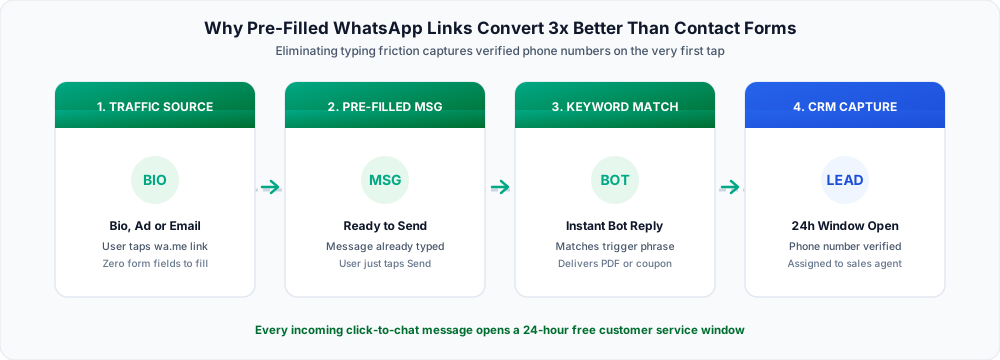
When you include a specific pre-filled message, two powerful things happen as soon as the user taps Send:
- Instant Keyword Routing in Your Chatbot: In AIsoule's Visual Chatbot Builder, you can set a keyword trigger that matches the exact pre-filled phrase (for example,
Send me the 2026 Catalog) and immediately replies with the PDF catalog and pricing options in under 2 seconds. - Free 24-Hour Service Window Opens: Because the customer initiated the chat by sending your pre-filled message, Meta opens a free 24-hour customer service window. Every reply your chatbot or sales agent sends during the next 24 hours costs $0 in Meta fees.
How to Track Lead Sources Across Instagram, Google, and Email
Because WhatsApp is a mobile app rather than a web page, standard Google Analytics utm_source tags get stripped if you append them directly to a wa.me URL without capturing them in the message body.
The reliable way to attribute every WhatsApp lead back to the exact channel, campaign, or creator is to include a short reference code inside the pre-filled text:

- Instagram Bio Link:
Hi! I'd like to book a demo [Ref: IG-BIO] - YouTube Video Description:
Hi! Please send the pricing checklist [Ref: YT-APR] - Pricing Page Sticky Button:
Hi! I have a question about the Growth Plan [Ref: WEB-PRICING] - Order Confirmation Email Footer:
Hi! I need help with my recent order [Ref: EMAIL-RECEIPT]
Want a floating WhatsApp button directly on your Shopify, WordPress, or custom site? Generate the embed script in 30 seconds with our free WhatsApp Website Chat Widget Generator.
Create your custom WhatsApp link now: Head over to aisoule.com/tools/link-generator/ to generate your wa.me link and high-resolution QR code for free.
Get Started →Frequently Asked Questions
Can I create a WhatsApp chat link for a regular personal or WhatsApp Business App number?
Yes. The https://wa.me/ link format works with standard WhatsApp numbers, the free WhatsApp Business mobile app, and numbers connected to the WhatsApp Business Cloud API.
How do I add line breaks inside a pre-filled WhatsApp link message?
In a raw URL, line breaks are represented by %0A. When you type multi-line text inside the AIsoule WhatsApp Link Generator, our tool encodes line breaks and emojis into valid UTF-8 characters automatically.
Why does my wa.me link say "Phone number shared via url is invalid"?
That error appears when the country code is missing, a leading zero was left in after the country code, or the phone number is not currently registered on WhatsApp.
Can I use bold and italic formatting inside a pre-filled WhatsApp link?
Yes. Wrapping words in asterisks (*bold*) or underscores (_italic_) inside your pre-filled text renders formatted text once sent. You can preview your styling first in our free WhatsApp Text Formatter.
How do I handle hundreds of daily clicks from a WhatsApp link?
Connect your number to AIsoule so incoming link clicks are greeted immediately by an automated chatbot and routed across a multi-agent shared team inbox.
Sources and implementation notes
Check current eligibility, rate cards and account requirements before implementation. Examples illustrate workflows unless linked to a documented customer case study. Migration timing and chat-history availability depend on the account and should be tested.
For pricing and setup details, see AIsoule plans and the help center.
You might also like
How to Choose a WhatsApp Marketing Platform in 2026: The 7 Technical Checks That Protect Your ROAS
Complete 2026 buyer
How to Send OTP Messages on WhatsApp (Faster Delivery & Higher Open Rates)
Learn how to send OTP messages on WhatsApp using the Business API. Compare WhatsApp OTP vs SMS, pricing, delivery rates, setup requirements, and best practices.
WhatsApp Chatbot Builder Guide: Designing Rule-Based Flows, AI Knowledge Bots, and Human Handoffs
Learn how to design high-converting automations in a visual WhatsApp chatbot builder. Compare quick reply buttons, list menus, native WhatsApp Flows, webhooks, and AI agents.
Enjoyed this article?
Get more WhatsApp marketing tips delivered weekly.