How to Send OTP Messages on WhatsApp (Faster Delivery & Higher Open Rates)
<strong>TL;DR:</strong> To send OTP on WhatsApp, businesses must register on the official WhatsApp Business API, create a Meta-approved authentication template, and connect their backend system via developer APIs. By using WhatsApp's direct internet delivery instead of cellular networks, companies bypass SMS delays, reduce costs by 40% to 70%, and improve verification rates to over 99%.
Reduce authentication drop-offs: Looking to integrate a faster, more reliable verification system? Connect with AISoule's Integration Engineers to access our developer API and set up WhatsApp OTP.
Get Started →Can You Send OTP on WhatsApp?
The direct answer is yes. Meta officially allows businesses to send OTP on WhatsApp using the WhatsApp Business API. By creating templates under Meta's "Authentication" category, companies can send secure, interactive verification codes, password resets, and two-factor authentication (2FA) messages directly to their customers' handsets.
For years, businesses relied on traditional SMS networks for identity verification. However, rising carrier rates, delivery failures, and security concerns have forced companies to look for alternatives. WhatsApp has emerged as a reliable replacement, bypassing carrier networks to deliver verification codes directly to users.
What Is WhatsApp OTP?
A whatsapp otp message is a secure, digital message containing a temporary, one-time passcode used to verify a user's identity during login, transaction approval, or account recovery. Unlike standard text alerts, a whatsapp one time password is delivered over IP networks to an active WhatsApp application, bypassing traditional cellular routing.
These verification messages are officially categorized as whatsapp authentication templates. They contain interactive features like "Copy Code" buttons that allow users to copy passcodes with a single tap, reducing login friction and improving the overall user experience.
Why Businesses Are Moving from SMS to WhatsApp OTP
If your authentication system relies solely on SMS, your business faces several hidden risks that can impact conversion rates and security:
- Low Global Delivery Success: Traditional SMS networks run on old telecom routing. Messages can be delayed or blocked by carrier spam filters, especially when sent across borders. This leads to user drop-offs during sign-ups.
- Rising SMS Carrier Fees: Local telecom carriers continue to increase SMS rates, with international codes attracting high fees. In comparison, Meta's authentication messaging pricing is lower and more predictable.
- Lack of Security: SMS codes are sent unencrypted across public network nodes, making them vulnerable to intercept attacks or SIM swap fraud. WhatsApp messages are end-to-end encrypted, protecting the code from interception.
- Poor User Experience: Traditional SMS does not support interactive buttons. Users must manually memorize or select codes from text fields, which can lead to errors. WhatsApp's interactive buttons allow users to copy codes with a single tap.
By implementing otp verification whatsapp configurations, businesses can address these challenges, ensuring faster delivery, lower costs, and a more secure login experience for users.
WhatsApp OTP vs SMS OTP: In-Depth Comparison
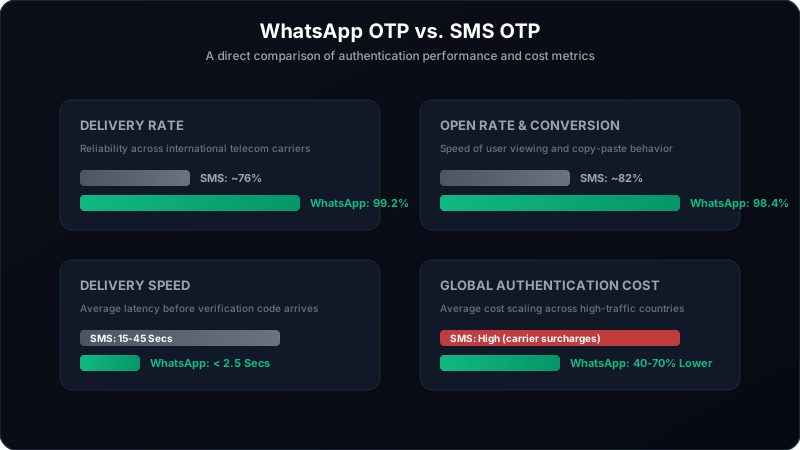
When deciding which channel to prioritize for your user authentication, it helps to compare the performance metrics of both systems side-by-side.
Improve your verification rates: Tired of failed SMS deliveries and frustrated users? Switch to WhatsApp OTP with AISoule to ensure fast, reliable delivery.
Get Started →How WhatsApp OTP Works (Architecture)
Sending verification codes requires a reliable connection between your application database and Meta's servers. Here is the technical architecture behind the delivery flow:
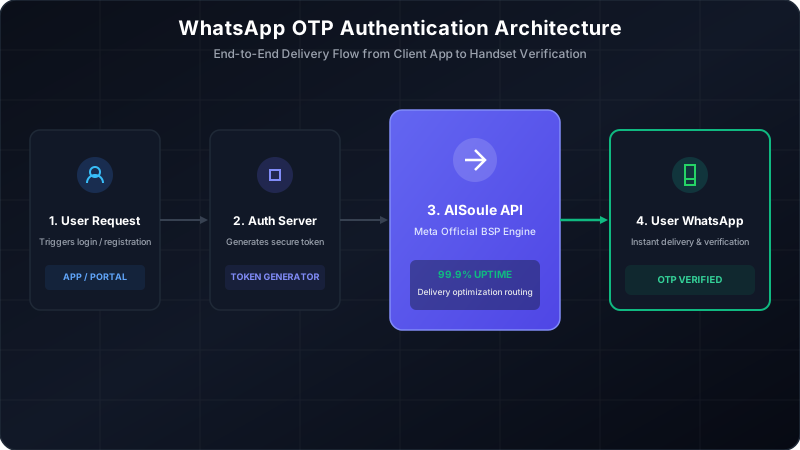
- User Interaction: A visitor enters their details on your login page and clicks "Verify Phone Number".
- Token Generation: Your backend authentication server generates a unique, one-time passcode and stores it in your database with an expiration time.
- API Request Trigger: Your system triggers an HTTP POST request to your BSP endpoint (e.g., AISoule API) containing the user's phone number and the verification code.
- Meta Endpoint Handshake: AISoule's system processes the request, matches it to your pre-approved Meta template, and routes the payload to Meta's servers.
- WhatsApp App Delivery: Meta routes the message to the user's registered WhatsApp application, displaying it in their active chat history.
- User Copy Action: The user taps the native "Copy Code" button, pasting the passcode into your login field to complete verification.
WhatsApp Authentication Messages Explained
To protect users from spam and phishing, Meta has strict requirements for whatsapp authentication messages. These rules help prevent fraud and keep the platform secure:
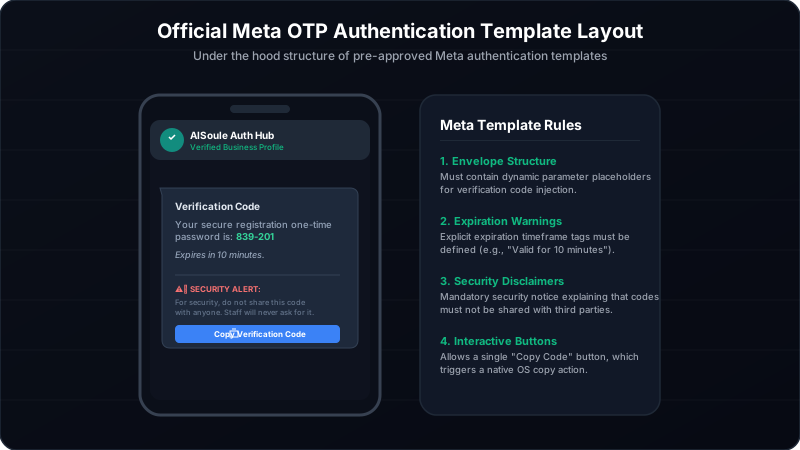
- Structured Template Category: Every verification message must belong to Meta's official Authentication category. You cannot mix marketing text or promotions with authentication codes.
- No Custom Headers: Authentication templates do not support custom image headers, media attachments, or decorative text. The focus is strictly on the verification code.
- Mandatory Security Alerts: Templates must include a warning disclaimer telling users not to share their verification codes with others.
- Native Expiration Meta-Tags: You must configure expiration settings (e.g., 5 or 10 minutes) in the template metadata. After this time, the "Copy Code" button is deactivated on the device.
How to Send OTP on WhatsApp Using Business API (Step-by-Step)
Follow these steps to set up and send WhatsApp verification codes through the official API:
Step 1: Set Up a Meta Business Suite Profile
Go to the Meta Business Suite and register your company profile. This profile will manage all your Meta developer assets, business pages, and API connection credentials.
Step 2: Complete Meta Business Verification
Submit your business registration documents and utility bills in the Meta Security Center. Business verification is required to unlock high-volume messaging limits and scale your verification system.
Step 3: Register a Verified Phone Number
Add a dedicated phone number to your Meta WhatsApp profile. This number will be used to send verification codes. Ensure it can receive an OTP via SMS or voice call to complete registration.
Step 4: Create Your Authentication Template
Draft your authentication template in your AISoule dashboard or the Meta Business Manager. Select Authentication as the category, add your security disclaimers, and configure the Copy Code button.
Step 5: Connect Your Backend via API
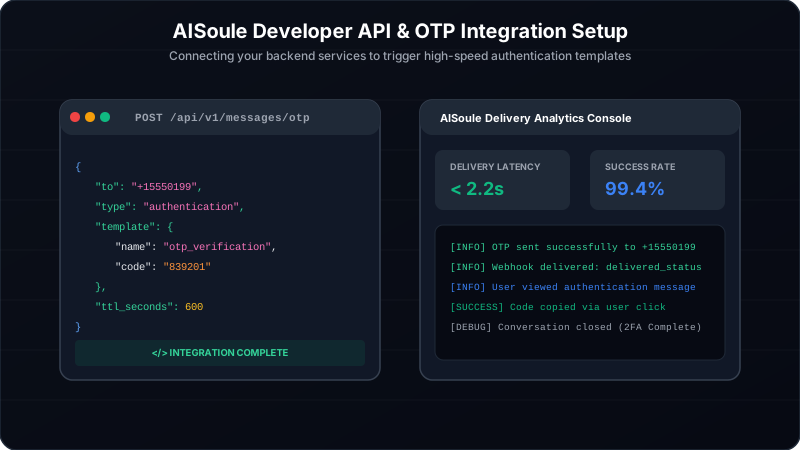
Integrate the AISoule developer API endpoint into your authentication system. Use the following payload format to trigger verification messages:
POST /api/v1/messages/otp Host: api.aisoule.com Authorization: Bearer YOUR_API_ACCESS_TOKEN Content-Type: application/json { "to": "+15550199", "type": "authentication", "template": { "name": "otp_verification", "language": { "code": "en_US" }, "components": [ { "type": "body", "parameters": [ { "type": "text", "text": "839201" } ] }, { "type": "button", "sub_type": "url", "index": 0, "parameters": [ { "type": "text", "text": "839201" } ] } ] } }
Step 6: Trigger Verification Codes
Configure your app to send this POST request whenever a user requests an OTP, delivering verification codes to their WhatsApp in real-time.
Step 7: Monitor Delivery Rates
Check the analytics console in your AISoule dashboard to track delivery rates, read statuses, and latency logs, ensuring codes are delivered reliably.
Step 8: Set Up Security Backups
Configure your system to automatically send a fallback SMS if the WhatsApp message fails to deliver within 15 seconds (e.g., if the user lacks internet access).
WhatsApp OTP Pricing & Cost Calculations
WhatsApp Business API pricing uses a conversation-based model. Meta charges a flat rate for a 24-hour conversation window, depending on the category of message sent (Marketing, Utility, Authentication, or Service).
For whatsapp business api otp messages, you pay the Authentication Conversation rate. Once you send a code, a 24-hour window opens, and any further verification codes or replies sent to that user during this window are covered under the initial charge.
Meta's authentication rates vary by country. Below is an overview of the typical costs:
- United States / Canada: ~$0.0135 per conversation
- India: ~$0.0014 per conversation
- United Kingdom: ~$0.0390 per conversation
- Brazil: ~$0.0315 per conversation
- Singapore: ~$0.0380 per conversation
Example Cost Calculations
Let us calculate the typical cost of using WhatsApp OTP across different monthly message volumes, assuming a mixed global user base with an average rate of $0.008 per verification conversation:
- Target Messages: 10,000 verification attempts
- Expected Delivery Success (99%): 9,900 delivered messages
- SMS Cost Estimate (at $0.02/SMS): $200.00
- WhatsApp OTP Cost Estimate (at $0.008/chat): $79.20
- Monthly Savings: ~$120.80 (60% Cost Reduction)
- Target Messages: 100,000 verification attempts
- Expected Delivery Success (99%): 99,000 delivered messages
- SMS Cost Estimate (at $0.02/SMS): $2,000.00
- WhatsApp OTP Cost Estimate (at $0.008/chat): $792.00
- Monthly Savings: ~$1,208.00 (60% Cost Reduction)
- Target Messages: 1,000,000 verification attempts
- Expected Delivery Success (99%): 990,000 delivered messages
- SMS Cost Estimate (at $0.018/SMS): $18,000.00
- WhatsApp OTP Cost Estimate (at $0.007/chat for bulk): $6,930.00
- Monthly Savings: ~$11,070.00 (Over 61% Saved)
WhatsApp OTP vs Twilio Verify
Twilio Verify is a popular authentication service used by developers. Let us compare the performance and features of WhatsApp OTP against Twilio Verify:
WhatsApp OTP vs Traditional SMS Providers
Comparing WhatsApp OTP to traditional SMS helps highlight why businesses are switching to IP-based verification:
Industries Using WhatsApp OTP
Different sectors use WhatsApp verification to streamline logins, protect accounts, and reduce delivery costs:
- E-commerce & Retail: To confirm account sign-ups, approve high-value transactions, and send delivery updates.
- Banking & Fintech: To verify login attempts, authorize transaction codes, and protect accounts with two-factor authentication (2FA).
- Healthcare Providers: To verify patient logins for online portals, secure medical records, and confirm booking updates.
- SaaS & Tech Platforms: To verify password resets, protect developer workspaces, and confirm registration details.
- Travel & Hospitality: To verify ticket bookings, secure check-ins, and confirm profile updates.
Key Benefits of WhatsApp OTP
Integrating WhatsApp verification offers several clear business advantages:
- Higher Open Rates: Users check WhatsApp regularly, leading to faster code extraction and higher completion rates.
- Faster Delivery: Bypassing telecom networks ensures codes are delivered quickly, reducing user wait times.
- Brand Recognition: Official verified profiles show users the message is legitimate, reducing security concerns.
- Lower Fraud Risk: Linking accounts to active app sessions makes it harder for attackers to hijack codes using SIM swapping.
- Global Reach: Reach customers globally without paying high international SMS fees.
Set up secure verification: Ready to move from SMS to a more reliable verification channel? Request Developer API Access from AISoule and start sending secure OTPs today.
Get Started →Common OTP Delivery Problems (And How WhatsApp Resolves Them)
Traditional SMS verification often suffers from delivery issues that disrupt the user experience:
- Carrier Spam Filters: Telecom carriers often block SMS messages containing verification codes, identifying them as spam. WhatsApp bypasses these filters by delivering messages directly over the internet.
- International Delivery Fees: Sending SMS codes internationally can be expensive due to carrier surcharges. WhatsApp uses flat, predictable rates per country, reducing international delivery costs.
- SIM Swap Fraud: Attackers can hijack phone numbers via SIM swapping to intercept SMS verification codes. WhatsApp requires an active app session, adding an extra layer of protection against these attacks.
- Telecom Congestion: High message volume can delay SMS delivery. WhatsApp's IP routing ensures codes are delivered quickly, even during peak usage.
Security Best Practices for Verification Codes
Keep your verification system secure by following these industry best practices:
- Set Expiration Limits: Configure verification codes to expire within 5 to 10 minutes to reduce the risk of misuse.
- Implement Rate Limiting: Limit the number of OTP requests per user session to protect your system from automated attacks.
- Use Fallback Channels: Set up a backup SMS system to send codes if the WhatsApp message fails to deliver within a set time.
- Add Security Warnings: Include a clear disclaimer in your templates advising users never to share their verification codes.
- Monitor Logs: Track delivery and verification patterns regularly to catch and block suspicious activity.
How AISoule Helps Businesses Send OTP Messages
Setting up WhatsApp verification on your own can be complex. AISoule simplifies this process with developer-friendly tools:
- Official Meta API: Connect directly to Meta Cloud API servers for reliable message delivery.
- Authentication Templates: Create and manage pre-approved verification templates easily.
- High Delivery Rates: Direct IP routing helps ensure your verification codes are delivered quickly.
- Developer APIs and SDKs: Integrate WhatsApp verification into your backend using our developer tools.
- Real-time Analytics: Track delivery rates, latency logs, and status responses from a single dashboard.
The Future of Authentication (2026–2030)
The authentication landscape is shifting toward faster, more secure methods:
- Passwordless Verification: Moving away from manual codes toward direct authentication links and app-based verification.
- Biometric Integration: Combining verification codes with fingerprint or facial recognition for added security.
- Passkeys: Broader adoption of secure, device-based passkeys as a replacement for traditional passwords.
Frequently Asked Questions (FAQ)
1. Can I send OTP on WhatsApp?
Yes, businesses can officially send OTP on WhatsApp using the WhatsApp Business API. By creating Meta-approved authentication templates, you can deliver secure, interactive verification codes directly to users.
2. How does WhatsApp OTP work?
When a user requests a code, your backend system triggers an API call to a Business Solution Provider like AISoule. The message is processed and delivered via Meta's secure network to the customer's WhatsApp application.
3. Is WhatsApp OTP cheaper than SMS OTP?
Yes, in many countries, WhatsApp OTP conversation rates are 40% to 70% cheaper than traditional SMS carrier pricing. You also benefit from higher delivery success, avoiding charges for failed attempts.
4. Can WhatsApp replace SMS OTP completely?
Yes, WhatsApp can serve as your primary verification channel. However, maintaining a basic SMS backup is recommended for customers who do not have active internet access or a WhatsApp account.
5. What are WhatsApp authentication messages?
Authentication messages are pre-approved Meta templates used specifically for verifying accounts, logging in, or resetting passwords. They include verification codes and security disclaimers.
6. How much does WhatsApp OTP cost?
Meta charges flat rates per conversation category, varying by country. For authentication, rates are typically between $0.003 and $0.015 per message, with no hidden telecom carrier fees.
7. How do I create a WhatsApp OTP template?
Create your template in the Meta Business Manager or AISoule portal. Select 'Authentication' as the category, add your dynamic code variables, security alert disclaimer, and a 'Copy Code' button.
8. Can businesses send verification codes through WhatsApp?
Yes, businesses can officially register their phone numbers on the Business API to send verification codes, password resets, and two-factor authentication alerts legally.
9. What is the delivery rate of WhatsApp OTP?
Unlike SMS carriers which experience filtering issues, WhatsApp OTP achieves delivery rates exceeding 99% by sending messages directly over IP networks to registered users.
10. Is WhatsApp OTP secure?
Yes. Every WhatsApp message is protected by end-to-end encryption. Meta's official verification badge also protects users from phishing attacks by showing that the sender is verified.
11. Do OTP messages expire on WhatsApp?
Yes. Meta requires businesses to set an expiration time (e.g., 5 or 10 minutes) in the template metadata, after which the 'Copy Code' button becomes inactive on the user's handset.
12. How does the 'Copy Code' button work?
The 'Copy Code' button is a native feature in Meta's authentication template. When clicked, it copies the code directly to the user's clipboard, making the login process seamless.
13. Do users pay to receive WhatsApp verification codes?
No. Receiving messages on WhatsApp is completely free for users. The business pays for the API call conversation according to Meta's standard rate card.
14. What is the average delivery speed of WhatsApp OTP?
WhatsApp OTP messages deliver in less than 2.5 seconds, compared to SMS codes which can take up to 45 seconds due to cellular carrier routing.
15. Can I use my existing WhatsApp Business number for OTP?
Yes. You can use your existing number via coexistence or direct registration on the API to send automated OTPs without losing your operational client number.
16. What happens if a user doesn't have WhatsApp?
If a user is not registered on WhatsApp, the API returns a delivery error. Your auth system should then route the verification code to a backup SMS provider.
17. Do I need Meta Business Verification to send OTPs?
Yes. Your business must complete Meta Business Verification to send verification codes at scale to production users.
18. What is the format of a WhatsApp authentication template?
A standard template must include the dynamic code placeholder ({{1}}), a security alert warning against sharing, and a single interactive 'Copy Code' button.
19. Can I send voice-based verification via WhatsApp?
No. The official WhatsApp authentication category only supports text templates. For voice-based verification, you must use a traditional VOIP calling platform.
20. Does WhatsApp OTP suffer from carrier filtering?
No. Because WhatsApp messages are sent via the internet, they bypass local carrier spam filters, preventing the delivery failures common with SMS.
21. How does WhatsApp OTP prevent SIM swap fraud?
WhatsApp accounts are linked to both a phone number and an active app session. This setup makes it harder for attackers to hijack codes using simple SIM swapping.
22. Can I send international verification codes via WhatsApp?
Yes. WhatsApp operates globally, allowing you to send international OTPs to users in over 180 countries without paying high cross-border SMS surcharges.
23. How do I monitor my OTP delivery rates?
You can monitor delivery rates, read statuses, and latency logs in real-time using the analytics console provided in your AISoule dashboard.
24. What is the maximum length of a WhatsApp verification code?
Meta supports verification codes up to 15 characters, but businesses typically use standard 4 to 8 digit numerical codes to keep verification quick and simple.
25. Does AISoule provide developer APIs for WhatsApp OTP?
Yes. AISoule provides developer APIs, SDKs, and webhook documentation to help you integrate WhatsApp verification into your backend authentication systems.
Conclusion
Traditional SMS is no longer the most reliable or cost-effective option for identity verification. By choosing to send OTP on WhatsApp, businesses can reduce verification costs by 40% to 70%, bypass carrier filtering, and improve delivery success to over 99%.
Partnering with a Meta-approved BSP like AISoule makes integrating WhatsApp verification straightforward. Connect your systems to our developer APIs, configure your authentication templates, and deliver a faster, more secure verification experience for your users.
Supercharge Your User Verification Flow Partner with AISoule to integrate fast, reliable, and cost-effective WhatsApp OTP services. Get Started for Free
Get Started →Sources and implementation notes
Check current eligibility, rate cards and account requirements before implementation. Examples illustrate workflows unless linked to a documented customer case study. Migration timing and chat-history availability depend on the account and should be tested.
For pricing and setup details, see AIsoule plans and the help center.
You might also like
How to Unblock WhatsApp Account: Causes, Fixes, and Best Practices
WhatsApp blocks accounts that violate its Terms of Service. Common reasons include sending unsolicited bulk messages, using unofficial WhatsApp clients or modded APKs, receiving too many user reports,
How to Integrate WhatsApp Business API with Make (Step-by-Step Guide)
Make.com (formerly Integromat) is a powerful no-code automation platform that connects apps and services. By integrating AIsoule with Make, you can automate WhatsApp workflows like sending order confi
Enjoyed this article?
Get more WhatsApp marketing tips delivered weekly.