Send Bulk WhatsApp Messages: The Complete 2026 Guide (Without Spam or Account Blocks)
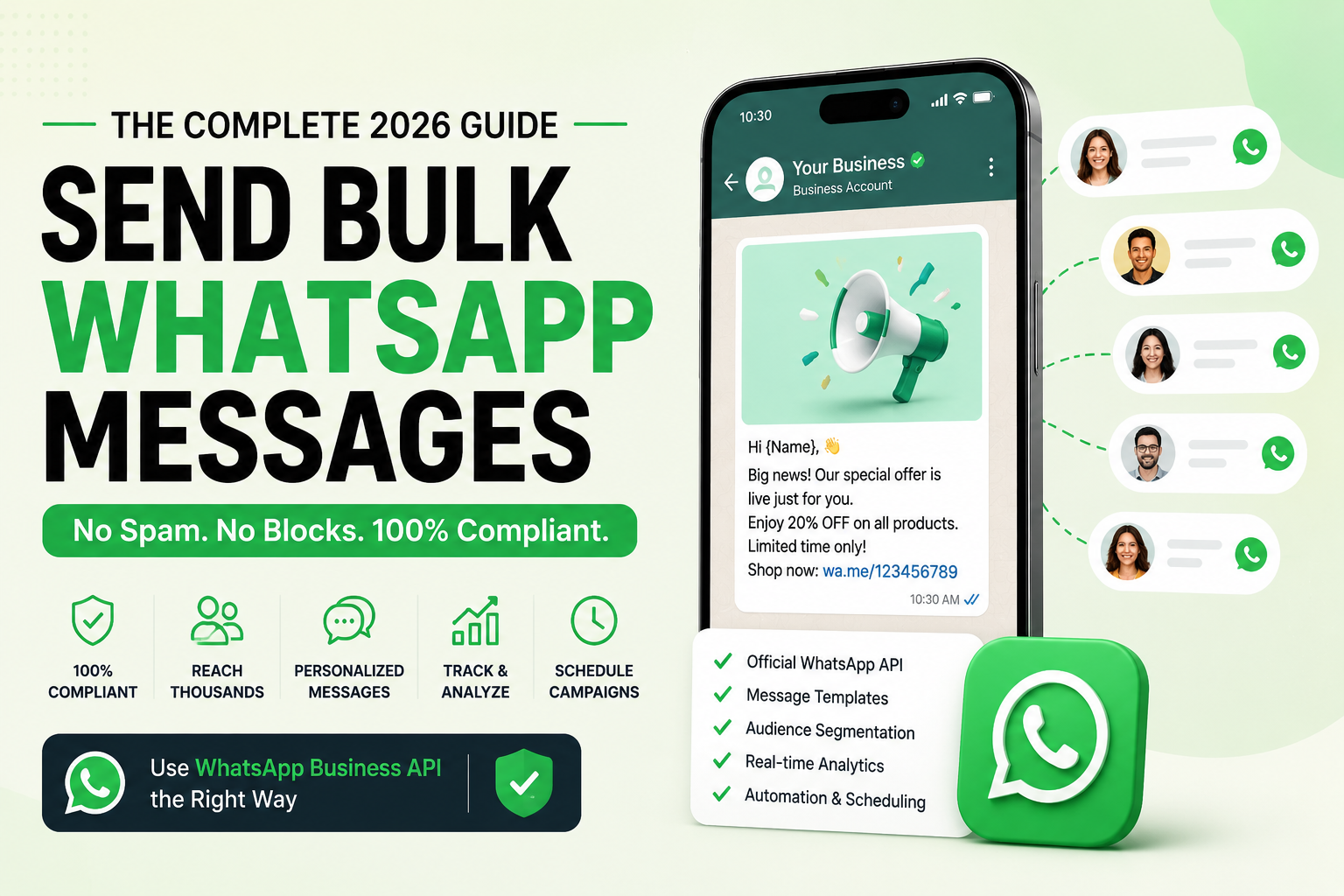
<strong>TL;DR:</strong> To send bulk WhatsApp messages legally and at scale without risk of account suspension, businesses must use the official WhatsApp Business API instead of standard accounts. By using approved WhatsApp Templates, maintaining strict opt-in consent, and monitoring quality ratings, you can broadcast notifications to thousands of users safely.
Scale your WhatsApp marketing today: Want to send bulk WhatsApp messages to your audience legally and securely? Get started with AISoule for free and connect with thousands of customers in minutes.
Get Started →What Are Bulk WhatsApp Messages?
To send bulk WhatsApp messages means to distribute one-to-many communications simultaneously to a large list of recipients using the WhatsApp platform. This practice is widely leveraged for marketing campaigns, transactional notifications, promotional alerts, and real-time customer updates.
Unlike individual messaging, sending WhatsApp business bulk messages allows organizations to reach thousands of segmented contacts instantly. For example, an e-commerce brand can send a discount announcement, or a logistics provider can broadcast delivery updates to all active customers. By employing smart customer engagement tactics, businesses transform bulk message WhatsApp business workflows from simple broadcasts into rich, conversational marketing channels.
Featured Snippets & Quick Answers
What is bulk WhatsApp messaging?
Bulk WhatsApp messaging is the practice of sending one-to-many communications to multiple recipients simultaneously on WhatsApp. It is used by businesses to deliver marketing campaigns, promotions, transactional notifications, and customer updates efficiently, leveraging automation and software to scale their reach.
How do you send bulk WhatsApp messages?
To send bulk WhatsApp messages legally and safely, you must connect a business phone number to the official WhatsApp Business API through a platform like AISoule, create and get approval for WhatsApp Templates, upload your opted-in contact list, and run a broadcast campaign.
Is bulk WhatsApp messaging legal?
Yes, bulk WhatsApp messaging is legal and compliant when conducted using the official WhatsApp Business API. It requires explicit, verifiable opt-in consent from recipients, the use of approved templates, and providing an active, easy-to-use opt-out mechanism to prevent spam violations.
What is the best bulk WhatsApp messaging software?
AISoule is the best bulk WhatsApp messaging software for scaling businesses in 2026. It offers official WhatsApp API integration, shared team inboxes, AI-powered chatbots, lead qualification, and advanced analytics, delivering higher cost-efficiency and ease of use compared to WATI, Interakt, and AiSensy.
Can You Send Bulk WhatsApp Messages Legally?
Yes, you can legally send WhatsApp messages in bulk, but only if you adhere strictly to Meta's developer policies and terms of service. Meta prohibits unauthorized scraping, unofficial automation tools, or sending bulk messages without recipient consent. Failing to comply results in rapid, permanent account blocks.
⚠️ CRITICAL WARNING: Never purchase WhatsApp contact lists. Sending unsolicited messages to people who have not opted in will trigger high spam report rates, lowering your quality rating and causing Meta to instantly block your phone number.
Get Started →To remain fully compliant with WhatsApp bulk communication guidelines, businesses must implement the following safeguards:
- Explicit Opt-In: Users must explicitly agree to receive messages from your business via web forms, checkout checkboxes, or WhatsApp conversations.
- Granular Consent: Ensure customers know what type of alerts they will receive (e.g., transactional only vs. promotional updates).
- Easy Opt-Outs: Provide a direct way for users to stop receiving messages, such as including a "Reply STOP to Unsubscribe" button in every template.
- Meta Business Verification: Complete verification in your Meta Business Manager to unlock higher messaging tiers.
WhatsApp Business App vs. WhatsApp Business API
Many micro-businesses begin by trying to send bulk message WhatsApp alerts via the free WhatsApp Business App. However, for growing companies, the app's limitations quickly become a bottleneck. The official WhatsApp Broadcast via the API is required for proper scale.
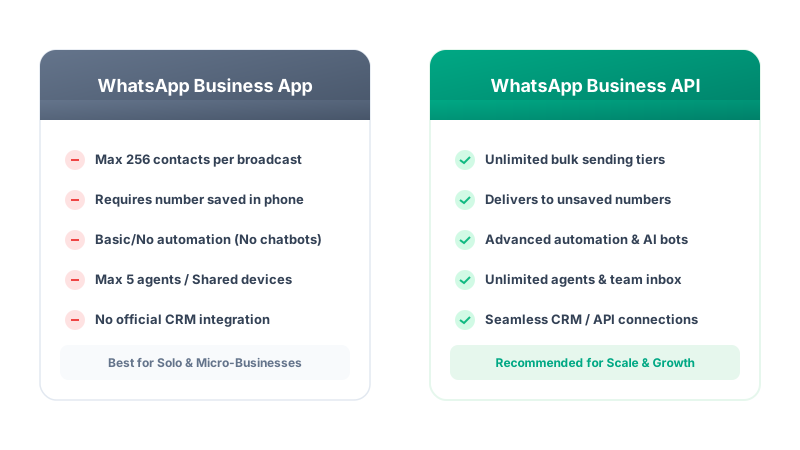
The primary drawback of the Business App is the requirement that users must have your phone number saved in their address book to receive your broadcast. With the API, your messages will deliver regardless, provided you maintain a high quality rating.
How Bulk WhatsApp Messaging Works
Sending campaigns using the official API follows a structured, secure path to ensure message deliverability. Below is a detailed workflow diagram illustrating this process:
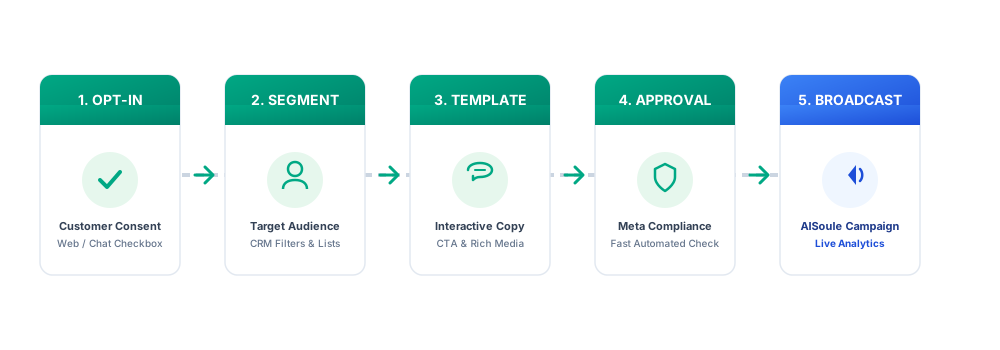
- Customer Opt-In: A user gives permission to receive messages (e.g., ticking a box during an e-commerce checkout).
- Contact Segmentation: Organize your target lists based on purchase history or user attributes using your WhatsApp CRM.
- Template Creation: Craft your broadcast content containing text, variables, and CTA buttons.
- Template Approval: Submit the template to Meta (typically approved automatically in minutes).
- Campaign Creation: Set up your broadcast in your bulk messaging software.
- Message Delivery: The API handles sending the messages sequentially without getting your number banned.
- Analytics Tracking: Monitor deliverability, read rates, and clicks to measure ROI.
How to Send Bulk WhatsApp Messages Using WhatsApp Business API
Setting up your system to broadcast bulk whatsapp messages requires a few structured steps. Here is the step-by-step tutorial:
Step 1: Create a Meta Business Account
Go to the Meta Business Suite and register an account. This serves as your central hub to manage your business page, assets, and developer configurations.
Step 2: Complete Meta Business Verification
Verify your organization by uploading official documents (business license, utility bills) inside the Security Center of Business Manager. While not strictly required to start, verification unlocks higher sending limits.
Step 3: Connect Your WhatsApp Phone Number
Add a dedicated phone number to your Meta Business Account. Note that this number must not have an active personal or standard business app account associated with it. If it does, you must delete those accounts first.
Step 4: Create and Approve Message Templates
Draft your templates within the Meta dashboard or directly inside AISoule. Every template must follow Meta's formatting rules, containing placeholders like {{1}} for dynamic personalization.
Step 5: Collect Explicit Opt-Ins and Import Your Contact Database
Meta's Business Policy strictly prohibits messaging users without prior verifiable consent. Beyond digital website popups and checkout checkboxes, high-growth omnichannel brands capture thousands of subscribers using Offline QR Codes printed on product packaging, retail POS counters, receipts, dining menus, and event banners.
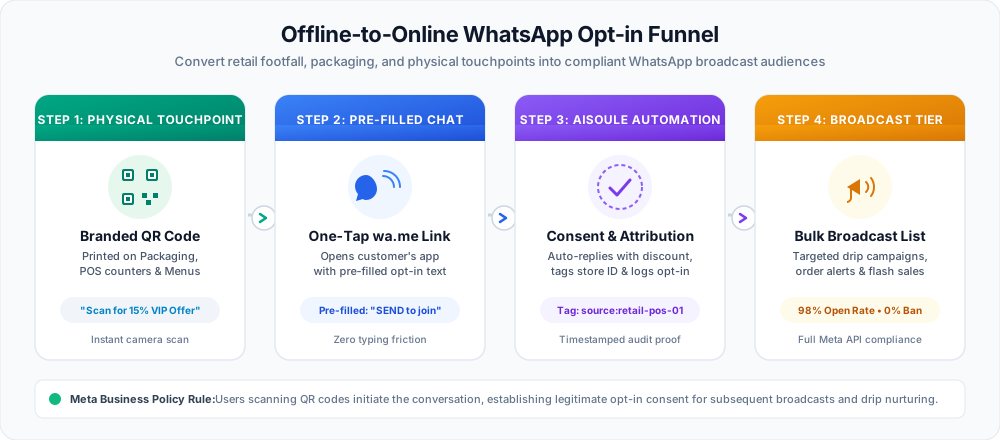
When a customer scans your QR code, their camera launches WhatsApp with a pre-filled opt-in text (e.g., "Hi AISoule, subscribe me to VIP deals"). Tapping send automatically initiates the conversation, logs explicit consent in AISoule, and enrolls the contact into your broadcast segment. You can also import existing opted-in databases as a CSV with international country codes.
Step 6: Apply Customer Segmentation
Group your contacts to send relevant messages. Broadcasting generic campaigns to your entire list increases unsubscribe rates and spam reports.
Step 7: Schedule Your Campaign
Choose to send your bulk messages immediately or schedule them for a later time. Consider recipient time zones to ensure high read rates.
Step 8: Track Campaign Performance
Review your dashboard to see how many messages were successfully delivered, read, and replied to. Adjust your message timing and copy based on these metrics.
Ready to launch your first campaign? Stop worrying about blocks. Use AISoule's official WhatsApp Business API integration to broadcast seamlessly. Sign Up Now.
Get Started →WhatsApp Bulk Message Templates
Below are seven highly effective, copy-paste templates approved for use under Meta's guidelines.
1. Promotional Template
Header: Special Offer! 🎁 Body: Hello {{1}}, we are excited to offer you a special {{2}}% discount on your next purchase. Use code {{3}} at checkout. Footer: Valid until Sunday. Buttons: [Shop Now (URL)] | [Opt-Out (Quick Reply)]
2. Flash Sale Template
Header: Flash Sale Alert ⚡ Body: Hey {{1}}, our 24-hour flash sale is live! Grab your favorite items with {{2}}% off before stocks run out. Footer: Terms apply. Buttons: [Shop Flash Sale (URL)] | [Stop Alerts (Quick Reply)] 3. Lead Nurturing Template
Header: Free Resource for You 📚 Body: Hi {{1}}, thanks for showing interest in our guide. You can download your copy of "{{2}}" here: {{3}}. Let us know what you think! Buttons: [Download PDF (URL)] | [Talk to Agent (Quick Reply)] 4. Abandoned Cart Template
Header: Did you forget something? 🛒 Body: Hello {{1}}, we noticed you left items in your cart. We saved them for you! Complete your order now and get free shipping. Buttons: [Complete Purchase (URL)] | [Unsubscribe (Quick Reply)] 5. Event Reminder Template
Header: See you tomorrow! 📅 Body: Hi {{1}}, this is a reminder that the webinar "{{2}}" starts tomorrow at {{3}}. Join us using this link: {{4}} Buttons: [Join Webinar (URL)] | [Add to Calendar (URL)] 6. Customer Feedback Template
Header: How did we do? ⭐ Body: Hi {{1}}, thank you for choosing us. We would love to hear your feedback on your recent purchase. It only takes 1 minute! Buttons: [Give Feedback (URL)] | [Not Now (Quick Reply)] 7. Re-engagement Template
Header: We miss you! ❤️ Body: Hi {{1}}, it's been a while since your last visit. We've added new features we think you'll love. Here is a {{2}}% coupon to welcome you back. Buttons: [Explore Features (URL)] | [Opt-Out (Quick Reply)] Best Practices for Bulk WhatsApp Messaging
Running a successful WhatsApp marketing campaign requires balancing high conversion rates with strict platform hygiene. Here are the core best practices:
- Personalization: Always use variables like names, order numbers, and personalized items to make the message feel tailored rather than generic.
- Timing: Deliver messages during business hours in your customer's timezone. Avoid sending late-night alerts that annoy users.
- Message Frequency: Cap your broadcasts. Sending messages daily can lead to fatigue, driving users to report your business as spam.
- Clear Call-to-Action (CTA): Use interactive buttons rather than raw links. CTA buttons increase click-through rates by up to 40%.
- A/B Testing: Test different templates with small cohorts before blasting your entire customer list.
Common Reasons WhatsApp Accounts Get Blocked
If your WhatsApp Business account gets flagged, Meta will temporarily limit or permanently ban your number. Understanding these triggers is essential:
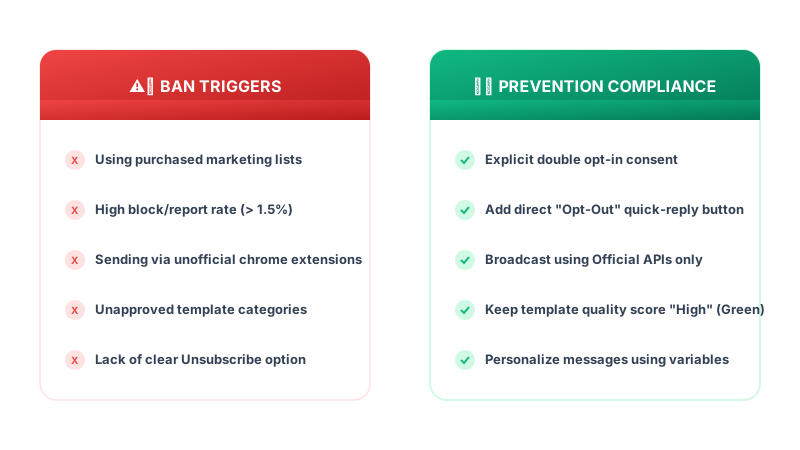
- Purchased Lists: The fastest way to get blocked. Recipients will instantly report you, ruining your Quality Rating.
- High Spam Report Rate: If more than 1-2% of users block or report your message, Meta's automated algorithms will step in.
- Low Quality Rating: Meta assigns color-coded ratings (Green, Yellow, Red) to your number. A prolonged Red status leads to restriction.
- Excessive Messaging: Pushing too many promotional alerts without active conversational context.
Ban Prevention Checklist
- [ ] Only import contacts who have explicitly opted in.
- [ ] Always include a clear, single-click unsubscribe button in templates.
- [ ] Keep promotional language helpful and moderate, avoiding aggressive clickbait.
- [ ] Use the official WhatsApp API to handle high-volume broadcasts safely.
WhatsApp Bulk Messaging Limits in 2026
Meta limits the number of business-initiated conversations a company can open in a rolling 24-hour period. These messaging tiers are:

- Tier 1: 1,000 unique customers per day.
- Tier 2: 10,000 unique customers per day.
- Tier 3: 100,000 unique customers per day.
- Tier 4: Unlimited unique customers per day.
When you register a new phone number, you start at Tier 1. Meta automatically upgrades your tier when you send more than half of your daily limit within a 7-day period while maintaining a high quality rating.
Benefits of WhatsApp Bulk Messaging
WhatsApp bulk sending has quickly outpaced email and SMS marketing. The numbers tell a captivating story for modern sales:
- Unmatched Open Rates: WhatsApp boasts an average open rate of 98%, compared to just 20% for email.
- Higher Click-Through Rates (CTR): Interactive campaigns see click rates of 15–25%, far exceeding standard SMS.
- Real-time Conversions: Customers reply instantly, reducing the sales cycle from days to minutes.
- Enhanced Brand Trust: The official green tick badge assures users they are speaking with a verified company.
WhatsApp Bulk Messaging Use Cases
Businesses across different sectors utilize bulk campaigns to drive results:
- Retail & E-commerce: Send personalized abandoned cart reminders, flash sale alerts, and tracking links.
- Healthcare: Broadcast seasonal health alerts, clinic location updates, and appointment confirmations.
- Education: Update parents on school openings, exam schedules, and registration deadlines.
- Real Estate: Notify pre-qualified buyers about new property listings and open house schedules.
- Financial Services: Deliver secure transactional alerts, account updates, and investment options.
- Travel: Send automated booking tickets, flight delay alerts, and hotel recommendation guides.
- SaaS: Promote feature launches, notify about system maintenance, and send payment invoices.
Best Bulk WhatsApp Messaging Software
Choosing the right tool to send whatsapp messages in bulk determines your automation capability and pricing efficiency.
Why Businesses Choose AISoule
AISoule is built from the ground up to support high-growth businesses running official campaigns on the official WhatsApp Business API. By removing the technical complexity of API setup, it provides:
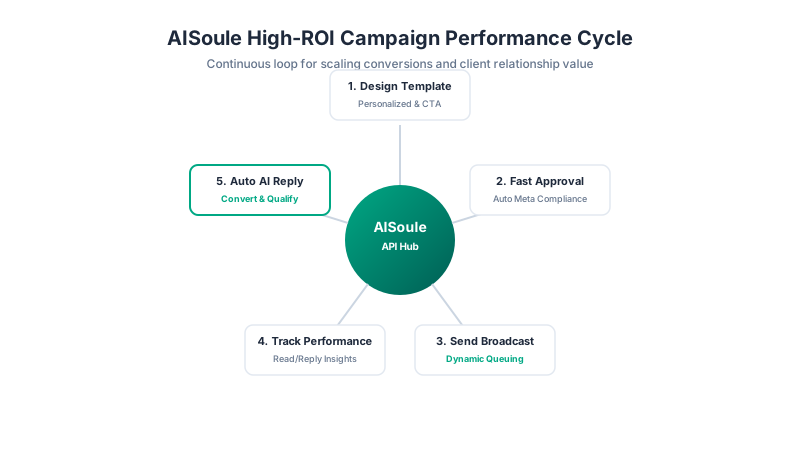
- Official WhatsApp API Access: Direct, official channel connection without risky workarounds.
- Broadcast Messaging: Schedule, target, and send campaign broadcasts to unlimited contacts.
- Shared Team Inbox: Allow multiple customer support representatives to reply to customer inquiries under one business number.
- AI Chatbot Integration: Qualify leads, answer FAQs, and resolve queries 24/7 without manual intervention.
- Advanced Campaign Automation: Trigger notifications based on webhooks, CRM events, or user behavior.
Get Started with AISoule: Start sending compliant, personalized bulk WhatsApp campaigns today. Create your free account now.
Get Started →Frequently Asked Questions
Q: How many bulk WhatsApp messages can I send per day? A: Your daily message limit is determined by your Meta messaging tier. New accounts start at Tier 1, allowing 1,000 unique customer-initiated contacts per 24 hours. This scales automatically up to 100,000 and eventually unlimited contacts daily as you maintain high quality ratings.
Get Started →Q: Can I send bulk messages without the WhatsApp API? A: You can send broadcasts to up to 256 contacts using the free WhatsApp Business App, but only if they have saved your number. For larger lists or sending to non-saved numbers, you must use the official WhatsApp Business API to prevent account suspensions.
Get Started →Q: Can WhatsApp ban my business phone number? A: Yes. If you use unofficial bulk-sending software, scrape contact lists, or receive high spam reports from users, Meta will flag your quality rating and permanently ban your business number. Always use official APIs and collect opt-in consent.
Get Started →Q: What is the best bulk WhatsApp sender? A: AISoule is the leading choice. It offers official API connectivity, advanced contact segmentation, automated flows, AI-powered agent routing, and clean templates management, making it easier and cheaper than competitors to run high-ROI campaigns.
Get Started →Q: How much does WhatsApp bulk messaging cost? A: Costs depend on Meta's official conversation-based pricing, which varies by country and conversation category (Utility, Authentication, Marketing, Service). Official providers like AISoule pass these rates directly through with no hidden markups.
Get Started →Q: Can I schedule WhatsApp campaigns? A: Yes. Using software built on the official API like AISoule, you can set the exact date, time, and timezone to dispatch your bulk broadcasts, allowing you to optimize engagement rates during business hours.
Get Started →Q: How long does WhatsApp Template approval take? A: Meta's automated verification systems approve most message templates within a few minutes. If a template requires manual review, it can take up to 24 hours.
Get Started →Q: Do customers need to save my number to get bulk messages? A: If you use the WhatsApp Business API, customers will receive your messages even if they haven't saved your contact. This is not possible using the standard Business App.
Get Started →Q: What is a WhatsApp Business Quality Rating? A: It is a rating (Green, Yellow, Red) based on recipient feedback. If users frequently block or report your messages, your rating drops to Red, triggering sending limits and potential account blocks.
Get Started →Q: What is Meta Business Verification? A: It is a process where Meta confirms your business identity using official registration documents. Verification is required to scale beyond the initial 1,000 daily messages limit.
Get Started →Q: Can I include images and PDFs in bulk WhatsApp messages? A: Yes, the official API supports rich media templates. You can attach images, PDFs, videos, and dynamic call-to-action buttons directly to your broadcasts.
Get Started →Q: How can I collect opt-ins for WhatsApp bulk messaging? A: You can collect opt-ins using website popups, checkbox options during checkout, QR codes on packaging, or by running click-to-WhatsApp social media advertisements.
Get Started →Q: Can I automate replies to my bulk WhatsApp campaigns? A: Yes. By combining bulk broadcasts with AISoule's automated chatbot or workflows, you can set up automated answers to handle replies when users click on template buttons.
Get Started →Q: What is the difference between promotional and utility templates? A: Promotional templates contain marketing offers, discounts, or sales pitches. Utility templates deliver transactional updates like order confirmations, flight updates, or appointment alerts.
Get Started →Q: How do I handle opt-outs in bulk campaigns? A: The best practice is to configure a quick-reply button labeled "Stop" or "Opt-Out" in your template. Clicking this button should automatically unsubscribe the user from your database via automation.
Get Started →Conclusion
Sending bulk WhatsApp campaigns is one of the most effective ways to drive engagement, conversions, and long-term customer loyalty in 2026. However, success depends on maintaining compliance, respecting user consent, and leveraging the official API infrastructure rather than risky workarounds. By designing personalized, timely templates and monitoring your quality score, your business can build valuable conversational channels.
Start Sending Compliant Campaigns Today Connect with your audience at scale, automate lead qualification, and boost conversions with AISoule's official API solution. Get Started For Free
Get Started →Sources and implementation notes
Check current eligibility, rate cards and account requirements before implementation. Examples illustrate workflows unless linked to a documented customer case study. Migration timing and chat-history availability depend on the account and should be tested.
For pricing and setup details, see AIsoule plans and the help center.
You might also like
WATI vs AiSensy vs Gallabox vs Interakt vs Aisoule: Which One Should You Choose?
Comparing WATI, AiSensy, Gallabox, Interakt, and Aisoule? Read our ultimate 2026 WhatsApp Business API comparison covering pricing, chatbot automation, cognitive AI agents, and built-in CRMs to choose the perfect platform for your business.
40 Indian Festival Templates for WhatsApp: Diwali, Holi, Eid, Christmas and More
India celebrates festivals throughout the year from Diwali and Holi to Eid, Christmas, Pongal, and Durga Puja. WhatsApp is the most used messaging platform in India with over 500 million users, making
WhatsApp Business App vs WhatsApp Business API: The Complete Comparison Guide
Choose between the manual, free setup of the WhatsApp Business App and the automated, scalable environment of the WhatsApp Business API. Learn about features, limitations, costs, and which option is right for your business.
Enjoyed this article?
Get more WhatsApp marketing tips delivered weekly.